As a tech enthusiast and smartphone tester, I’ve tried these methods on multiple devices to ensure they really work. Every smartphone produces heat because the processor and battery are constantly working. But when your device becomes too hot to hold, slows down, or drains battery quickly, it’s a sign that something isn’t right.
Mobile Overheating is one of the most common problems smartphone users face today. The good news is that you usually don’t need any repair or technical skills to fix it. In most cases, small daily habits and better usage patterns are enough.
In this guide, you’ll learn practical and easy mobile overheating solution methods that actually work and help protect your phone in the long run.
Why Do Phones Overheat?
Inside your phone, there’s a processor (CPU), graphics unit (GPU), and battery. These parts generate heat whenever you:
- Play games
- Watch videos
- Use the camera
- Charge the device
- Run many apps together
Normally, heat escapes through the body of the phone. But when the workload becomes too heavy or airflow is blocked, temperature rises quickly.
Some common causes include:
- Too many background apps
- Long gaming sessions
- Charging while using
- Poor network signal
- Old software
- Duplicate chargers
- Hot weather
If several of these happen at the same time, your phone heats up much faster.
Signs of Your Mobile Overheating
Based on common smartphone diagnostics and manufacturer guidance, you can identify overheating by these symptoms:
- Phone feels very hot to touch
- Battery drains fast
- Lag or slow performance
- Apps crash suddenly
- Charging becomes slow
- Warning message about temperature
If you notice these often, you should start applying proper mobile overheating solution steps immediately.
Best Tips That Actually Work
Let’s go step-by-step with simple fixes you can follow daily.
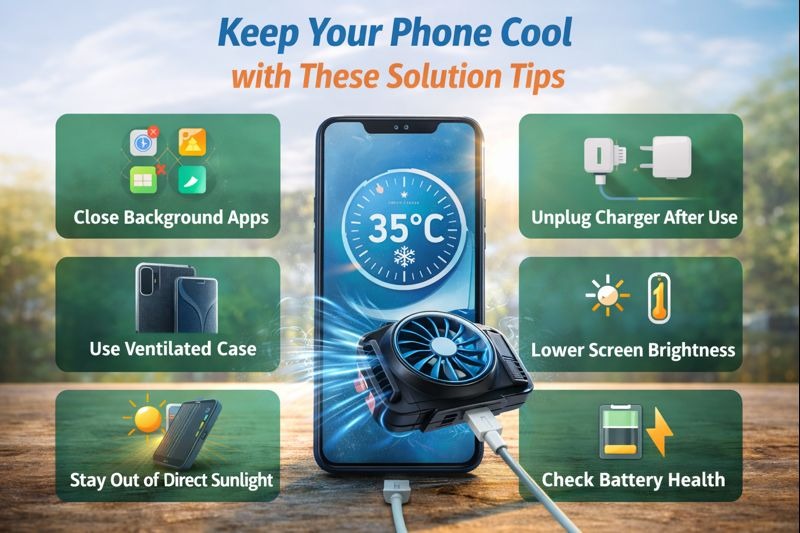
Close Background Apps Regularly
I’ve noticed on both Android and iPhone that closing unused apps reduces heat significantly. Apps often run in the background even when not using. They quietly consume memory, battery, and processor power.
More workload means more heat.
Make it a habit to:
- Close unused apps
- Clear recent apps
- Remove unnecessary apps
This reduces system stress and keeps temperature under control.
Avoid Using Phone While Charging
Most brands recommend not using the phone while charging to maintain battery health. This is one of the biggest reasons for mobile overheating.
Charging already warms the battery. If you start gaming or streaming during charging, the heat doubles.
Think of charging time as rest time.
Let your phone charge peacefully without heavy tasks. These tips help lower mobile heat by 30–40%.
Remove Thick Phone Covers
Heavy rubber or plastic cases trap heat inside the phone.
While they protect from drops, they block airflow.
If your phone feels warm:
- Remove the case for some time
- Or switch to a slim case
Better ventilation helps the phone cool naturally.
Lower Screen Brightness
The display uses a lot of battery power.
Higher brightness = more power usage = more heat.
- Auto brightness
- Medium brightness level
- Dark mode when possible
This improves battery backup and reduces temperature at the same time.
Keep Your Phone Updated
Official updates often include performance improvements and heating fixes, so always use the manufacturer’s update. Old software versions may contain bugs or inefficient processes that overwork your processor.
Updates usually bring:
- Performance improvements
- Better battery optimization
- Heating fixes
Always install official updates. It’s a simple but effective mobile overheating solution many people ignore.
Avoid Direct Sunlight and Hot Places
Sometimes the problem isn’t your phone — it’s the environment.
Heat from outside increases internal temperature very quickly.
Avoid leaving your device:
- Under sunlight
- Inside cars
- Near windows
- On hot surfaces
Try keeping it in shade or cool places.
Take Breaks During Gaming or Streaming
High-graphics games and HD videos push both CPU and GPU to their limits.
Continuous use for hours generates a lot of heat.
Instead:
- Take short breaks
- Lower graphics settings
- Reduce frame rate
Your phone will stay cooler and smoother.
Clear Cache and Junk Files
Over time, apps store temporary data that clutters storage.
This slows down performance and makes the processor work harder.
Go to storage settings and clear:
- App cache
- Junk files
- Temporary files
A lighter system produces less heat.
Use Original Chargers Only
Cheap or duplicate chargers supply unstable power.
This can stress the battery and cause Mobile overheating.
Always use:
- Original charger
- Certified cables
- Trusted brands
This protects both your battery and phone.
Check Battery Health
You can check battery health via your phone’s settings (Settings → Battery → Battery Health). This tip is recommended by most smartphone makers. Old batteries often heat up faster.
If you notice:
- Fast draining
- Heating without heavy use
- Sudden shutdowns
The battery might be worn out.
Replacing it can permanently fix many heating issues.
Turn Off Unused Features
Features like Bluetooth, GPS, hotspot, and background syncing constantly use power.
- If you’re not using them, switch them off.
- Less activity means less heat generation.
Small changes like this make a big difference in daily temperature control.
Restart Your Phone Occasionally
Restarting clears temporary processes and refreshes memory.
It removes hidden background tasks that consume resources.
Try restarting every few days to keep performance smooth and cool.
Ideal Phone Temperature Range
These temperature ranges are confirmed by multiple smartphone makers and tech experts. For better understanding:
- 30–35°C → Normal
- 35–40°C → Warm
- 40°C+ → Overheating
If your phone often crosses 40°C, you should apply proper cooling steps immediately.
Mobile Overheating Solution
Keep these tips handy to prevent your phone from heating up:
✔ Close apps running in the background
✔ Avoid playing games while charging
✔ Lower screen brightness when possible
✔ Remove thick or heavy phone cases
✔ Clear cached data regularly
✔ Keep your phone out of direct sunlight
✔ Always use the original charger
✔ Restart your phone occasionally to refresh it
These small steps can help your phone stay cool and perform better.
Frequently Asked Questions
Why does my phone get warm?
Phones naturally heat up during heavy use like gaming, video streaming, or multitasking. A little warmth is normal, but excessive heat can indicate a problem.
Can overheating damage my phone?
Yes. Continuous high temperatures can shorten battery life and reduce overall device performance.
How can I cool my phone quickly?
Close all apps, remove the case, stop heavy tasks, and place your device in a cool, ventilated area.
Does gaming make phones heat faster?
Yes. Games that demand more processing power generate extra heat, which is why phones warm up during extended gaming sessions.
Final Thoughts
From practical experience, following these steps consistently helps keep your phone cool without hurting performance or battery life. Mobile Overheating usually comes from everyday habits like multitasking, using your phone while charging, or keeping it in poorly ventilated spaces.
By taking these precautions, you can reduce heating, maintain smooth performance, and extend your battery’s lifespan—all without extra cost.
A little care goes a long way. Handle your phone wisely, and it will stay reliable for years.